How Long Do Photos Stay in Recycle Bin? Device-by-Device Guide
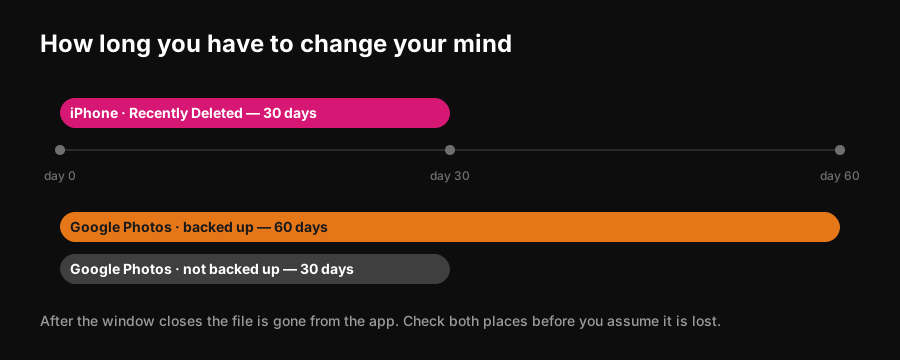
iPhone gives you 30 days. Google Photos gives you 60 if the photo was backed up and 30 if it was not. The differences matter, because deleting in one place does not delete in the other.

Every modern photo app has a holding area for deleted images, and the window before permanent deletion is different on each one. Here are the numbers that matter.
The windows
| Where | How long | Where to find it |
|---|---|---|
| **iPhone / iPad Photos** | 30 days | Photos → Albums → Recently Deleted |
| **Google Photos, backed up** | 60 days | Google Photos → Collections → Trash |
| **Google Photos, not backed up** | 30 days | Same place |
| **Android device gallery** | Usually 30 days | Gallery → Trash or Recently Deleted |
| **Windows Recycle Bin** | Until emptied, or 30 days if Storage Sense is on | Desktop → Recycle Bin |
The Google Photos split catches people out. A photo that was backed up gets sixty days; one that only ever existed on the device gets thirty. Same app, same trash, different clocks.
If you are not sure whether something was backed up, assume thirty days. Recovering early costs nothing; recovering late is not possible.
Deleting in one place does not delete in the other
This is the single most common source of confusion.
- Deleting from **Google Photos** with backup on removes it from the cloud **and** from synced devices.
- Deleting from your **iPhone camera roll** does not remove a copy already backed up to Google Photos, and vice versa.
- **iCloud Photos** propagates deletions across all your Apple devices, and the thirty-day clock runs once, not per device.
If a photo seems to have vanished, check every app that had access to it before concluding it is gone.
Recovering a photo
- 1Open the relevant app.
- 2Find the trash: **Recently Deleted** on iOS, **Trash** in Google Photos, **Recycle Bin** on Windows.
- 3Select the photos and choose Restore. They return to their original album with their original date.
On iPhone, Recently Deleted is locked behind Face ID or your passcode by default.
After the window closes
Once the retention period expires the file is gone from the app, and no amount of scrolling will bring it back. Whether it is genuinely unrecoverable from the storage medium is a separate and much more technical question — for practical purposes, treat the deadline as final.
Why this matters if you post photo dumps
Aggressive camera-roll cleaning is how good photos get lost. People delete in bulk to reclaim space, then a month later want the one blurry frame that would have made the dump.
Two habits help: never bulk-delete on the same day you shot, and do your cutting inside a tool that shortlists rather than deletes. PhotoDump narrows a day or a trip down to a postable set without removing anything from your library — the originals stay exactly where they were, on your device.
Common questions
Thirty days in the Recently Deleted album, after which they are permanently removed.
Sixty days if the photo was backed up, thirty days if it was not.
If backup and sync are on, yes — the deletion propagates to synced devices. If sync is off, the copies are independent.
Not through the app. Once the retention window closes the photo is removed permanently, so restore before the deadline.